

Table of Contents
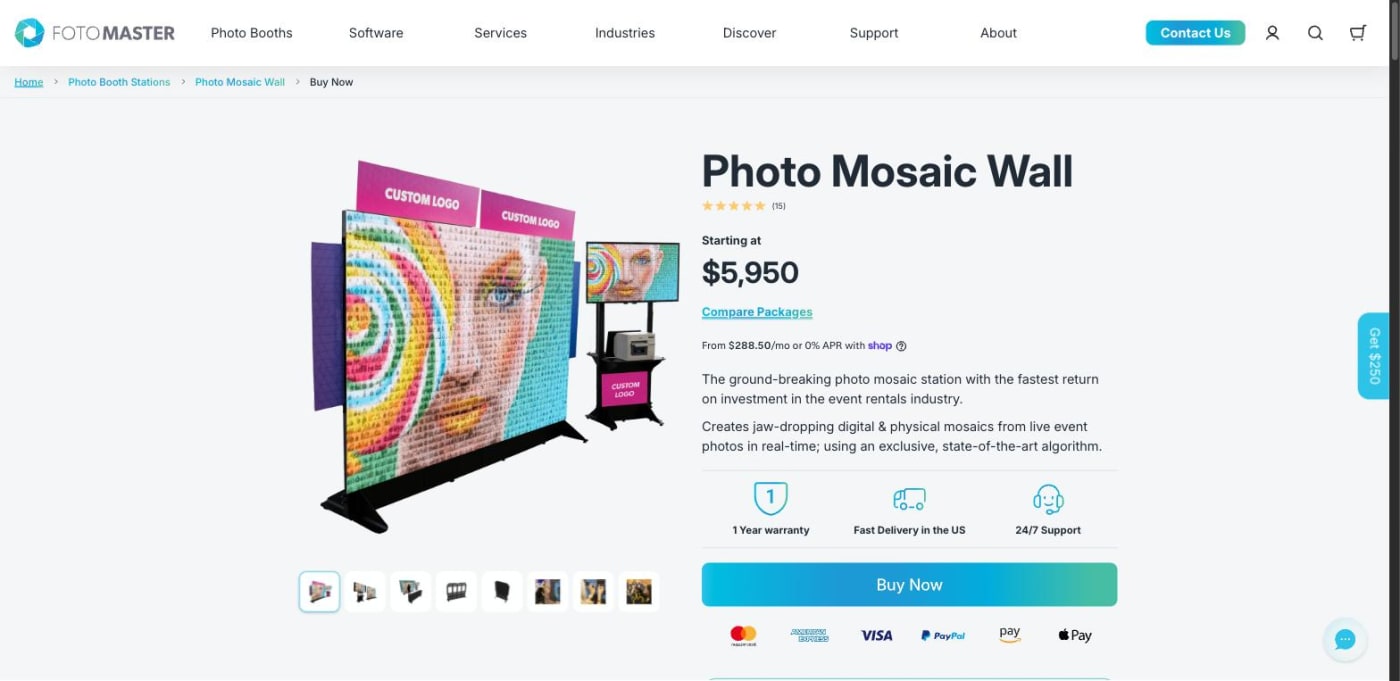
If you're pricing a Foto Master alternative, or weighing Foto Master vs Snapbar on a sourcing sheet, the decision isn't about which mosaic looks better. Both build a picture out of guest photos as the room fills. What differs is what you're buying. Foto Master sells a photo mosaic wall as equipment you own and run. Snapbar delivers the mosaic as part of one activation, priced for the event.
That sets everything else: who's standing at the wall, what it costs, and what starts billing in year two. Every Foto Master figure below comes from their own pages, checked September 2026. Start with our mosaic displays for the format itself.
Key takeaways
- Foto Master sells the mosaic as equipment: $5,950 or $9,950, checked September 2026.
- Year one of either package includes PMWall, Virtual Mosaic, 24/7 support and Cloud Basic, so no monthly fee belongs in a first-year total. Year two adds $99 a month per device plus the required cloud.
- Their own FAQ tells operators to charge brands "typical event rates ranging from $2,000 to $8,000," which is what a brand-side buyer faces.
- Snapbar prices the event: $1,995 for the Digital Photo Booth plus $1,995 for the Live Mosaic add-on, so 500 guests is approximately $4,000.
- Theirs runs on Windows with a label printer and staff placing tiles. Ours runs in a browser on a kiosk, an iPad, a laptop, phones, or all at once.
Who is each one built for?
Foto Master builds for the businesses that rent equipment out. Their FAQ names the customer without hedging: "Event professionals, rental companies, entertainment venues, retail locations, and marketing agencies." The pitch is return on investment "in the event rentals industry." Then the FAQ goes further than most vendors dare and tells that buyer what to charge: "typical event rates ranging from $2,000 to $8,000."
That's the most useful sentence on their site, and we'll come back to it. They sell the equipment to the businesses that rent it out, then help them price the rental. It's a real market and a well served one, and if you're building a rental line, buying the wall is the right decision.
Snapbar sits on the other side of the same transaction. We write for a corporate marketing team running a brand activation at a conference or trade show: one date, one budget line, a procurement review. They're buying an outcome, not an asset.
Snapbar vs Foto Master, side by side
Both columns are sourced. Foto Master's comes from their own product, software pricing, package, FAQ and support pages; ours from the live Snapbar platform pricing page. Where their pages don't state something, the cell says so.
| Foto Master | Snapbar | |
|---|---|---|
| What you buy | A photo mosaic wall station you own, plus software and cloud subscriptions | One delivered activation, priced per experience |
| Published price | $5,950 Bring Your Own package; $9,950 Turn Key package | Digital Photo Booth $1,995; Live Mosaic add-on $1,995 |
| Software | PMWall for Windows, $99/month per device billed annually; first year included with either package | Browser-based, included in the experience price, no per-device licence |
| Cloud | Foto Master Cloud required, $39/month Basic or $79/month Pro per company; first year of Basic included | Included in the experience price |
| Where it runs | Windows desktop | Any browser: kiosk, iPad on a stand, laptop, guests' phones by QR code, or all at once, with no charge for devices or concurrency |
| How guests contribute | "Guests' Own Phones: Scan a QR and upload with Selfie Wi-Fi," a local folder, or the Cloud event gallery | Guest QR upload with no booth session required, or a booth session |
| Physical output | Printed 2" x 2" tiles guests place on the board; 10,000 labels included, refills $900 per 10,000 | On-screen mosaic, with custom corner logos and portrait or square tiles; MP4 recap export on request, not self-serve |
| When the wall is full | Template setting; with "Stop," their documentation describes later arrivals as photos not placed | The wall never runs out of room, so every guest makes it in, including late arrivals |
| Moderation | "Approve photos before they reach the wall. Switch it on or off mid event." | Auto-approve, manual approval or AI-assisted, staff-configured, in the same dashboard as the rest of the activation |
| Lead capture | "Collect names and contact details with consent built into the form." | Flexible lead capture, consent-gated by default, with non-consented details dropped before fanout |
| CRM, webhook and API destinations | Not stated publicly on the pages we checked | Real-time delivery into HubSpot, Slack, signed webhooks and Zapier, plus a published /v1 partner API, pilot-gated per account and configured with our team |
| Other displays alongside the mosaic | Not stated publicly as bundled with the mosaic product | A live gallery, a slideshow and a leaderboard with every activation, with as many instances of each as you want |
| Guest-facing translations | Not stated publicly on the pages we checked | Built-in translations, $695 add-on |
| Branding | "Set the grid to whatever the space needs, and brand the physical board itself for your client." | Subtle Snapbar branding on guest-facing surfaces by default; the Whitelabeling add-on at $1,495 removes it |
| Who they sell to | "Event professionals, rental companies, entertainment venues, retail locations, and marketing agencies." | Corporate marketing and event teams buying one activation |
Two rows carry the weight: what you buy, and where it runs. A Windows licence per device and a printer full of labels make one kind of event day. A browser and a QR code make another.
What does a photo mosaic actually cost on each side?
A Foto Master mosaic wall costs $5,950 or $9,950 to buy, plus subscriptions from year two and consumables once the first 10,000 labels run out. A Snapbar mosaic activation for 500 guests costs approximately $4,000. Those aren't the same unit, and treating them as though they were is how this comparison goes wrong.
The Bring Your Own package is $5,950 and the Turn Key package is $9,950. Both package pages publish the same included list: the modular mosaic wall and TV stand, a 55" TV, a laptop with an i5 and 8GB of RAM, an Epson C4000 label printer, a 20-pack ink bundle, 10,000 2" x 2" labels and the mosaic boards, plus the first year of PMWall, Virtual Mosaic, 24/7 support and Cloud Basic.
Year one is genuinely covered, and it would be dishonest to pretend otherwise. Both packages include PMWall for Windows, Virtual Mosaic, 24/7 support and Cloud Basic for a year. Anyone stacking $99 a month onto a first-year total is inflating their price by over a thousand dollars. Year two is where the running costs appear.
| What starts in year two | Foto Master's published figure |
|---|---|
| PMWall for Windows licence | $99/month per device, billed annually, about $1,188 a year per device |
| Foto Master Cloud (required) | $39/month Basic or $79/month Pro, per company rather than per device |
| Virtual Mosaic, the browser mosaic add-on | $49/month add-on |
| 24/7 support (optional) | $27/month per licence, billed annually |
| Label refills | $900 per 10,000-label pack, once the included run is used |
| Ink beyond the included 20-pack | Not published |
| On-site staff to print and place tiles | Not published |
This next part favours them, and it favours them a lot. A bought kit is capital, not an event cost, and it gets cheaper every time it goes out the door. Across forty events a year, a $9,950 Turn Key package is about $250 an event before software, labels and staff. Across two, it's closer to $5,000. An operator running forty dates and one running two read very different numbers off the same invoice, and that gap is the point of their model.
Which brings us to what a brand pays. If you aren't buying the wall, you're hiring someone who did, and their FAQ tells that operator what to charge you: "typical event rates ranging from $2,000 to $8,000." That's the honest apples-to-apples figure, and it's their number.
On our side the Digital Photo Booth is $1,995 and Live Mosaic is the one add-on display at $1,995, per the Snapbar platform pricing page, checked September 2026. A 500 guest activation lands at approximately $4,000, 1,000 guests at approximately $4,350.
What their figure excludes: those prices buy the wall and its first year of software, cloud and support, not the people who print and place tiles during the event, label refills at $900 a pack on their own store, or the renewals that start in year two.
What ours includes: the approximately $4,000 covers one delivered activation for 500 guests, with the mosaic display, the capture experience, 30 days of live runtime, a live gallery, a slideshow and a leaderboard with as many instances of each as you want, custom branding, live moderation, lead capture and branded delivery.
What does it take to run photo mosaic software at an event?
On their side: a Windows machine, a label printer, and people. PMWall is photo mosaic wall software for Windows, paired with an Epson C4000 and ink because the output is physical. Their support documentation is candid about the labour, describing a setting that prints "each tile as it is placed, so staff can build the physical board during the event."
Be fair about what that buys. A physical wall guests walk up to, find themselves on and peel a tile from is a genuinely good thing, and the rig is light: 45 to 55 lbs of stands one person can assemble in minutes. A screen doesn't replicate that. It also buys a staffing line nobody budgets for.
Ours runs in a browser. Guests contribute by scanning a QR code and uploading from their phone with no booth session required, or through a booth session at a capture point you set up. Deploy it however the room calls for: a kiosk, an iPad on a stand, a laptop, guests' phones by QR code, or all at once, with no charge for devices or concurrency. A second kiosk never adds a licence.

A Live Mosaic can also be the entire activation, with no booth in the room. Our team configures and delivers that with you, and our guide to picture mosaics covers the layout decisions.
What happens when the wall fills up?
Theirs stops, if you tell it to. PMWall templates carry a "When the wall is full" setting, and their support documentation describes Frozen as "a normal end state when the wall is full and the template's When the wall is full setting is Stop." Later arrivals join the not-placed list, alongside duplicates and failures. The setting is configurable, so Stop is a choice, but it's the path their documentation walks through.
Think about when that lands. The last half hour of a show floor is often the busiest. A guest who scans at 4:45, hands over their email and never appears gets the one bad version of the experience, in front of an audience.
Ours behaves differently: the wall never runs out of room, so every guest makes it in. A full mosaic keeps taking new photos by swapping older repeats, so the person who scans at 4:45 still watches their face land on the board. Put the same question to any mosaic vendor you're weighing: what does the wall do in the last half hour?
Who moderates it, whose brand is on it, and where does the lead data go?
Both sides moderate. Foto Master's software page states "Moderation: Approve photos before they reach the wall. Switch it on or off mid event." Ours runs as auto-approve, manual approval or AI-assisted, staff-configured rather than guest-facing, and guest uploads follow the same flow as booth sessions.
Branding splits on where it lives. Theirs is physical, and it's a good pitch: "brand the physical board itself for your client." On ours, subtle Snapbar branding sits by default on the microsite footer, displays, delivery emails and the sharing page, and the Whitelabeling add-on at $1,495 removes it.
Lead data is where the models separate most. Their mosaic page describes collecting "names and contact details with consent built into the form." Where that record goes next, whether a CRM destination, a webhook or an API exists, is not stated publicly on the pages we checked. Our lead capture is consent-gated by default, so non-consented details are dropped before anything fans out, and the data reaches HubSpot, Slack, signed webhooks, Zapier and a published /v1 partner API in real time, pilot-gated per account and configured with our team rather than switched on by you. Where your event lead data actually goes covers it.
Two smaller things: translations are a $695 add-on, and every activation carries a live gallery, a slideshow and a leaderboard, the axis live event displays compared works through.
See it in action
A mosaic that fills up in front of the room
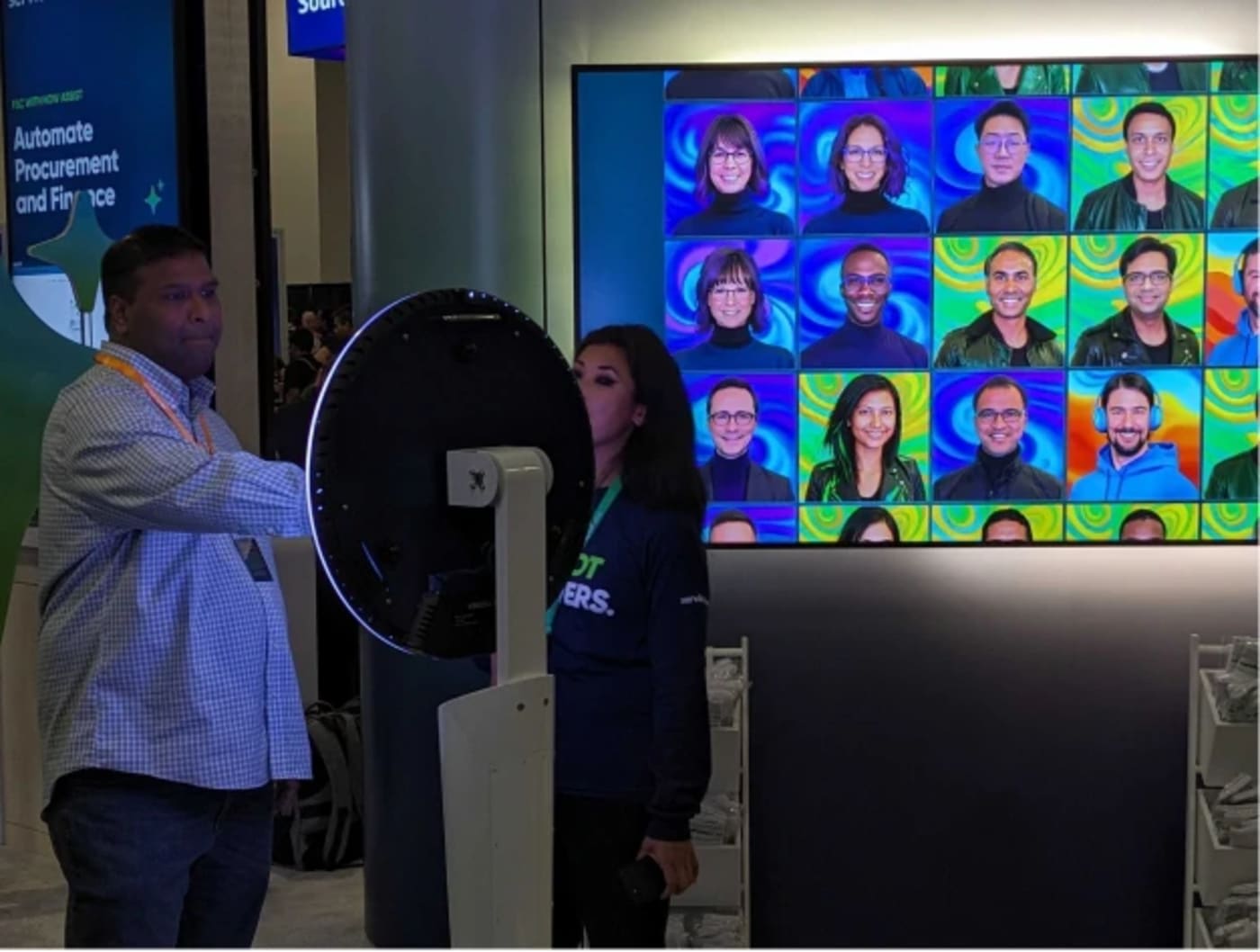
Guests scan a QR code, upload from their phone, and watch the picture build. Moderation, branding and lead data sit in the same activation, set up and delivered with our team.
Explore Mosaic DisplaysFoto Master or Snapbar: which one fits?
Choose Foto Master if you're building or running an event rental business, you want equipment on your books that amortises across a season, you want a physical wall guests touch and take a tile home from, and you have staff to run it. At forty events a year their cost per event is hard to argue with.
Choose Snapbar if one brand is running the activation, you want a single number you can defend in a budget review, you want the mosaic, the capture experience, the displays and the lead data in one place, and you want it on whatever devices the room calls for, or all at once. Most people arriving on a Foto Master alternative search are in that group.
Still building the shortlist? Picture Mosaics, the wider mosaic roundup, and on the capture side Snappic, Movebooth, Simple Booth, Dreamwave, the AI roundup and the hub. Not sure which side you're on? Ask us.
Sources: Foto Master figures were checked in September 2026 against fotomaster.com (the photo mosaic wall product and package pages, the photo mosaic software pricing page, the labels store listing and the FAQ) and its published support documentation; where a page did not state something, we say so. Snapbar totals are approximate, computed from published experience prices and included usage, checked September 2026.
Want a mosaic priced for your event, not your equipment budget?
One quote, one activation, with the mosaic, the displays and the lead data included.
Let's TalkOr explore: Mosaic Displays | Lead Capture