






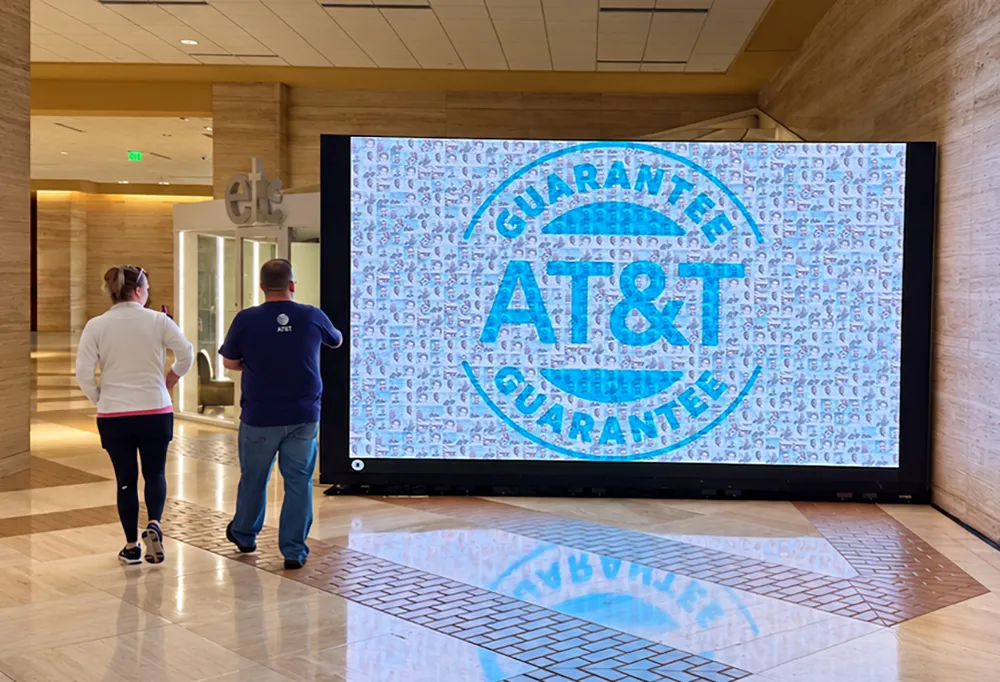
A live photo mosaic wall is a display that assembles guest photos into one large branded image while an event is happening. Each photo becomes a tile, and the picture fills in as people add to it. Guests contribute from their own phones by scanning a QR code, or from a photo experience, and the wall updates every couple of minutes.
Live Photo Mosaic Wall for Events
Display a dynamic wall of guest photos and content that builds itself in real time. It runs on any internet-connected device that can load a webpage.
Trusted by event teams at
What is a live photo mosaic wall?
How a Live Mosaic Works
1 of 5image
Choose the image
Upload the logo or artwork the mosaic builds toward, then set the grid density, tile shape and blend.
Decide how photos arrive
Guests can scan a QR code to contribute from their phones, or use a Snapbar photo experience to generate and populate content. Or both!
Set your moderation
Approve every photo, approve none, or let the platform screen them.
Display it on screen
Easily load and display your live mosaic on a TV, a projector, a laptop, or all of them at once.
Keep it afterward
Every photo is yours to download, and we can export a recap video of the wall assembling itself. Just ask.
Put It On Every Screen You Have
The live mosaic is simply a unique link, so it opens full screen on a TV, a projector, a laptop, an LED video wall, or all of them at once, with no charge for extra screens. The display pans and zooms on its own, spotlights each new photo as it lands, and allows for different animation choices.
You Control What Goes On The Wall
You can choose to approve every photo before it appears, approve none and let them flow, or let the platform screen submissions for you. If needed, you can also password protect your display URL.
Nobody Gets Left Off
The wall never runs out of room, so every guest makes it in. When it fills up it makes space by swapping out a photo that already appears more than once, and the grid gets denser as the crowd grows. Whether it's the first person walking by, or the last person at the event, everyone enjoys the same experience.
Post-Event Value
Easily export every piece of content from your dashboard, named however you need for a CRM import.
You can also add a Static Mosaic or Video Mosaic to keep showing off your masterpiece well after the event is over.
Launch Your Own
Live Photo Mosaic
Get in touch for demos, pricing, questions, and recommendations.
Thanks, we've got it
Our team reviews each submission and will follow up directly soon.
Explore activation conceptsSomething went wrong. Please try again.
Live Photo Mosaic Wall FAQs
What image can the mosaic build toward?
A logo, a wordmark, a product shot, or any artwork with enough contrast to read at a distance. Send Snapbar an SVG or a large PNG and we will tune the grid density, tile shape and blend with you before the event. If you are not sure the image will work, send it over and we will test it.
How many photos does it take before the mosaic looks right?
It starts reading as your image earlier than most people expect, and it keeps getting sharper as photos land. Snapbar's team sets the grid density to suit the crowd you are expecting, so a 200-person dinner and a 5,000-person conference each get a wall that looks full rather than sparse.
Can guests find their own photo on the wall?
Yes. Snapbar's Live Mosaic zooms deep enough for someone to walk up and pick themselves out, and it tours the wall on its own between spotlights, so faces keep surfacing without anyone touching the screen.
Can we run the mosaic on more than one screen?
As many as you like, at no extra cost. A Snapbar Live Mosaic is a link, so a screen at the booth, one in the lounge and one on the main stage all show the same wall.
What happens to the wall after the event?
It stays up as long as you need it, every photo is downloadable from your Snapbar dashboard, and we can export a recap video of the wall assembling itself. Ask us and we will put one together.