





Live Polls for Events

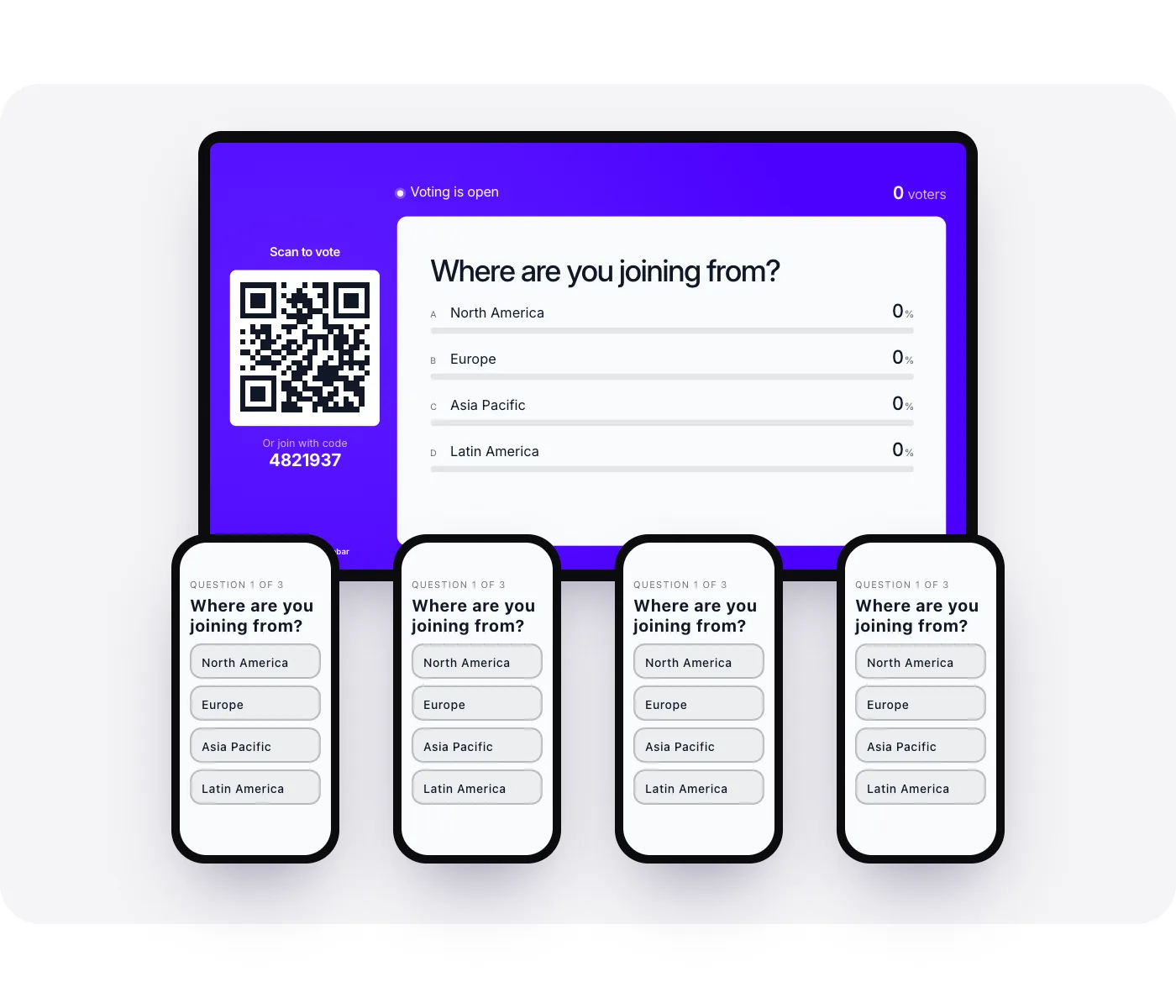
Guests vote from their own phones, no app needed, and the results build on the big screen as the room answers.

Trusted by event teams at

  • Dreamforce logo
  • MyWellbeing logo
  • TED logo
  • Visa logo
  • Adobe MAX logo
  • Glovo logo
  • GAP logo

What is a live poll for events?

Snapbar's Live Polls turns a room into a vote. Guests scan a QR code on the screen or type a short join code, answer from their own phone with nothing to download, and watch the results build on the venue display as the votes come in.

You write the questions ahead of time, run the show from the dashboard, and keep every result afterward.

How a Live Polls Activation Works

1 of 5questions

  1. Write your questions

    Build the poll ahead of time: multiple choice, a rating, a word cloud, or open text, in the order you'll ask them. Any question can carry a voting timer.

  2. Put the code on screen

    Your display shows a QR code and a short join code. Guests scan or type it and they're in, with nothing to install.

  3. Run the show

    Our team moves from question to question on your cue. Votes land on the screen as they come in, and everyone watches the result take shape together.

  4. Review what goes on the wall

    Hold typed answers for review, then approve the ones you want on screen and hide the rest. Choice and rating questions post on their own.

  5. Keep the results

    Every question's breakdown is in your dashboard the moment the poll ends, with a CSV, an image of each result, and a report you can hand to a sponsor.

Four ways to ask the room

  • Multiple choice

    Guests pick from the answers you write, and the bars build as the votes land. Add a timer and the room watches the clock run out.

  • Rating

    Ask the room to score something, and watch the result build as the scores come in.

  • Word cloud

    One word from everyone. The words that come up most grow largest on the screen.

  • Open text

    Longer answers, held for your review before any of them reach the wall.

The whole room, on one screen

Snapbar's Live Polls runs on the event screen, so the vote is something the whole room watches together rather than something a speaker checks on a laptop. Put the results display on the stage screen, a monitor at your booth, or a TV in the lounge, and run it alongside the event's photo, AI, and prize experiences on one platform and one order.

It works best where people are already facing a screen: a keynote, a sponsored session, a reception with a wall. In a busy aisle where nobody is looking up yet, start them with a Spin to Win or a photo experience, then poll them once they've stopped.

Why Teams Choose Snapbar for Live Polls

  • No app, no login

    Guests scan a code or type a short one and vote from the browser on their phone. The line to take part is as short as it gets.

  • Our team runs the show

    Tell us the run of show, and we advance each question on your cue while you stay with your audience.

  • Nothing reaches the wall unreviewed

    Hold word cloud and open text answers for review before they show. Your screen stays on topic, however lively the room gets.

  • Results you can hand to a sponsor

    Per-question breakdowns, a CSV export, an image of each result, and a report written for the people who paid for the session.

  • Runs on any screen

    The results display is a link. Put it on the stage screen, a booth monitor, or a TV in the lounge, in as many places as you want.

  • One platform for the whole event

    Run Live Polls alongside your photo, AI, and prize experiences on the same platform and the same order, with 10,000+ activations behind it.

    explore the experiential marketing platform

Run Live Polls at Your Next Event

Tell us about the event and the questions you want to ask. We'll set the poll up with you, and you'll have the platform to watch the results come in.

Thanks, we've got it

Our team will be in touch soon.

Explore activation concepts

Live Polls Frequently Asked Questions

How do live polls work at an event?

Snapbar's Live Polls puts a QR code and a short join code on your event screen. Guests scan or type it, answer each question from their phone's browser, and the results build on the screen as the votes come in. You write the questions ahead of time and move through them from the dashboard during the session.

Do guests need to download an app to vote?

No. With Snapbar, guests scan the code on the screen or type a short join code and vote in their phone's browser. There's nothing to install and no account to create, so the whole room can be voting moments after the question goes up, including the people who arrived late.

What kinds of questions can we ask?

Four kinds: multiple choice, a rating, a word cloud, and open text, and any of them can carry a voting timer. Snapbar's Live Polls lets you mix them in one session, so a keynote can open with a quick vote, gather one-word reactions in a word cloud, and close with written feedback, all on the same screen.

Can we review answers before they appear on screen?

Yes. Snapbar's Live Polls can hold word cloud and open text answers for review, so you approve what goes on the wall and hide what doesn't belong there. Choice and rating questions post on their own, since there's nothing to type, and the screen stays on topic either way.

What do we get after the poll ends?

A breakdown of every question in your Snapbar dashboard, plus a CSV export, an image of each result, and a report you can hand to a sponsor or stakeholder. Nothing disappears when the session ends, so the answers are still there when you plan the next event.

How much does a live poll cost?

Live Polls is priced per event, and the total depends on how many people take part and what else you're running alongside it. Tell us about the event and Snapbar's team will put together an exact quote, including any photo or prize experiences you want on the same order.

Get in touch

For demos, pricing, and questions.

Access Platform Pricing

Enter your email and you’ll receive a link to our platform pricing where you can build quotes and request proposals.